Seat 150 wedding guests in 15 minutes.
Free to build. The list never leaves your browser.
A seating-chart maker that runs in your browser. Paste the guest list, drop tables on a canvas, mark who sits together and who does not, press Auto-seat, then drag to fix what it got wrong. Print the floor plan, the per-table lists, an alphabetical board for the door and an escort-card CSV.
Free to build, with no sign-up. Paste the list, run Auto-seat and see every export at full size on screen.
$12 once per event turns on printing and copy-as-text for the four exports: floor plan, per-table lists, the door board and the escort-card CSV.


- Your guest list stays in your browser
- No account to create
- Works in any modern browser
- One payment, no subscription
Three steps from a spreadsheet to a seating chart your venue can read.
Start with rules, not tables. List every pair who must sit together and every pair who must not, then let Auto-seat fill from the head table outward. The pictures below are the actual app, running the sample wedding.
-
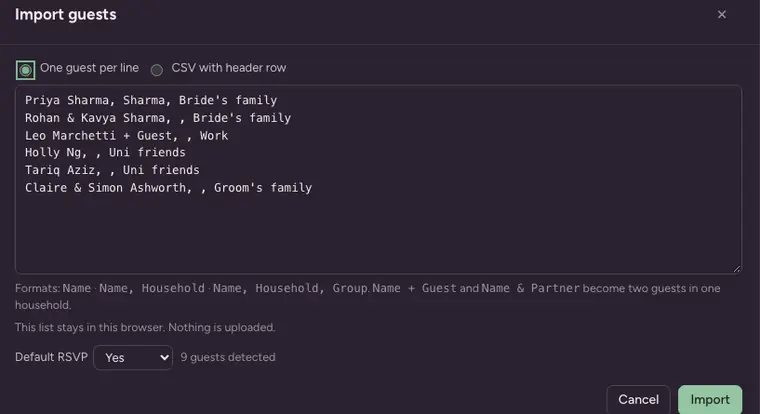
1 Paste the guest list
Names, plus-ones and party sizes straight from your sheet.
Name + Guestbecomes two guests in one household.About 3 minutes
-
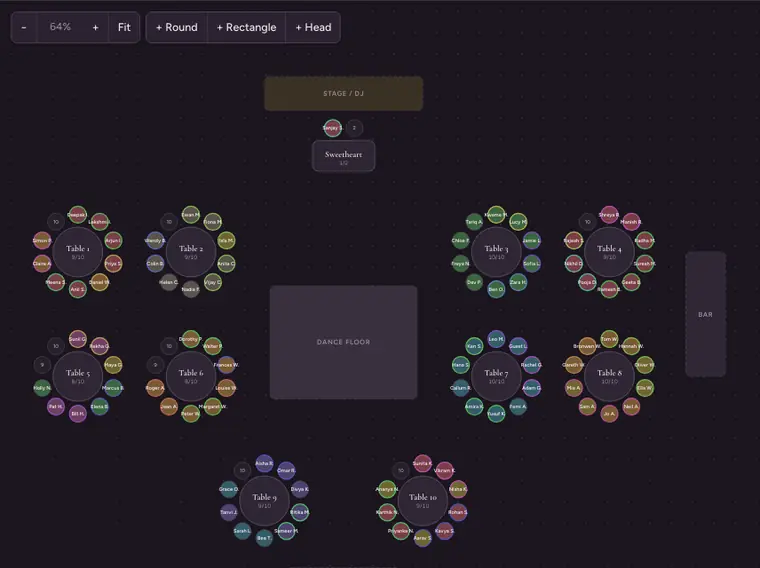
2 Set rules, press Auto-seat
Keep grandparents together. Keep the two uncles apart. Auto-seat honours every rule, then you drag guests between seats to fix anything it got wrong.
About 10 minutes
-
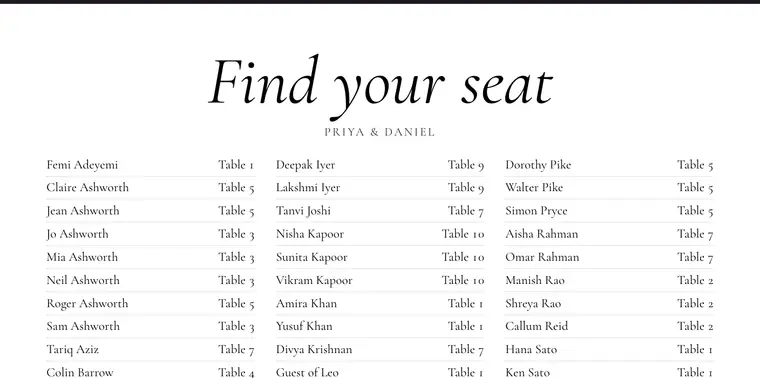
3 Export what each person needs
Each export opens as a print view: floor plan for the venue, per-table lists for the caterer, escort-card CSV for the stationer, alphabetical board for the print shop. Print it or save it as a PDF from your browser.
About 2 minutes


Divorced parents, college friends and unknown plus-ones land somewhere sensible.
Paste a list, get a roster
Copy from Sheets, Excel or Notes. Plus-ones and parties stay grouped as households, and duplicates are skipped.
Tables on a canvas, guests on seats
Round, rectangle and head tables, plus the dance floor, bar, stage and entrance. Drag a guest to any seat and the rules panel tells you if that breaks something.
Keep-together and keep-apart rules
Usually under 20 pairs. Auto-seat honours every one of them; anything it cannot satisfy is flagged in the Conflicts tab instead of hidden.
Every file your vendors asked for
Venue, caterer, stationer and print shop each get their own export the same night, and you can re-export as the list changes.
Floor plan
Table numbers and shapes exactly as you drew them. Print or save as PDF from your browser.
Per-table lists
One block per table, guests in seat order, with meal and notes.
Find your seat board
Every guest sorted by surname across columns, sized for an easel at the door.
18 × 24 24 × 36 A1
Escort-card CSV
One row per seated guest, ready for a mail merge.
Less than a print run of place cards.
Most seating tools charge per export or per project, or want an account before you can paste a name. Seatwise charges once, for the exports, after you have seen the whole chart work.
| Tool | Price | Auto-seat | Poster board | No sign-up |
|---|---|---|---|---|
| SeatwiseBrowser, list stays on your computer | $12 once per eventFree to build and auto-seat | Yes, with rules | 18×24, 24×36, A1 | Yes |
| SeatPlanWeb app | £8 to export | Manual placement | Chart export only | Account required |
| SeatCanvasBrowser tool | Free to 40 guests$19.99 one-time Event Pass beyond that | Yes | No dedicated board | Yes |
| Planning.WeddingWeb app | $28 per project | Manual placement | Chart export only | Account required |
| PerfectTablePlanDesktop software | $29.95 and up per licence | Yes | Via page setup | Install and licence key |
| ZolaPart of a wedding suite | Free with account | Manual placement | Screen only | Zola account required |
Competitor pricing and features as published on their own sites in September 2026. If we have something wrong, write to us and we will correct it.
Prismm and AllSeated close on December 31. Your charts should not.
Planners: export your guest list from Prismm or AllSeated as a CSV, paste it into Seatwise, and rebuild your tables in minutes. No account to create first, so you can keep working the moment you have the file.
Venues: the same move works per event. Export, paste, rebuild. $12 per event, no subscription to renew and no seat count to justify to finance.
Running several events a year? The Planner licence is $49 a year for unlimited events, with your own name and logo on the printed plans. See the planner page.
Move a chart nowTry the whole thing first. Pay once when the chart is right.
Every edit, every Auto-seat run and every export preview is free, at full size on screen. Pro turns on printing and copy-as-text, so you pay only once the chart is right.
Free
$0
For building the chart and convincing yourself it works.
- Up to 2,000 guests and 200 tables, unlimited rules
- Auto-seat with keep-together and keep-apart
- Drag-to-fix on the canvas
- Full-size previews of every export
- Printing and copy-as-text need Pro
Pro
$12one-time, per event
A licence key that turns on printing and copy-as-text for every export, for one event.
$9 until October 4 with code PRODUCTHUNT, already on the button below
- Floor plan with table numbers
- Per-table lists for the caterer
- Alphabetical board at 18×24, 24×36 or A1
- Escort-card CSV
- Re-export as often as you like
If an export does not work and we cannot fix it, you get a full refund within 14 days. Tell us the size you chose and what the print shop said.
Things people ask before they paste the list.
Anything else, write to aimansadab+seatwise@gmail.com. A person answers.
Where does my guest list go?
What happens after I pay?
What if the board misprints?
Does it work on my phone?
Can my planner use it?
How many guests can it handle?
The board goes to the print shop the same night.
Made by a small team, launched September 2026. We do not have a wall of customer quotes yet. When we do, they will be real ones with names on them.